
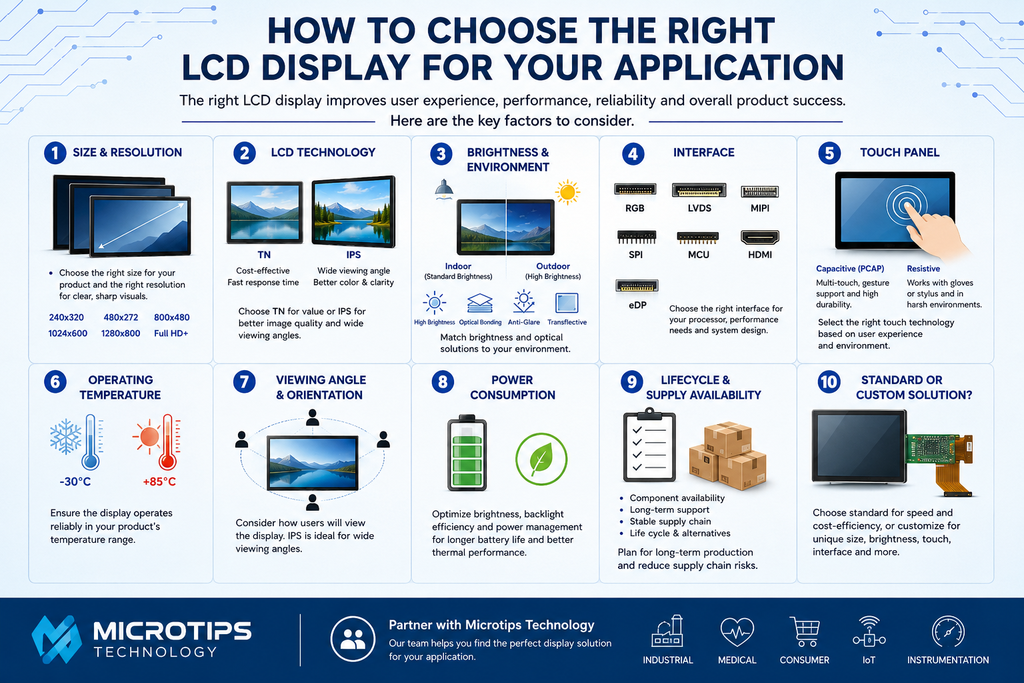
Choosing the right LCD display is an important part of designing a successful electronic product. The display affects not only how users interact with the device, but also its performance, durability, power consumption, and overall cost.
With so many LCD technologies, sizes, resolutions, interfaces, and customization options available, selecting the right display can seem complicated. At Microtips Technology, we work with customers to identify display solutions that match their technical requirements, operating environment, product lifecycle, and budget.
Here are the most important factors to consider when choosing an LCD display for your next project.
1. Determine the Display Size and Resolution
The first step is determining the physical size of the display and the resolution your application requires.
Display size is typically measured diagonally, but engineers should also consider the active area, viewing area, module dimensions, thickness, and available space inside the enclosure.
Resolution determines how much information can be displayed and how detailed the image will appear. Common TFT LCD resolutions include:
- 240 × 320
- 480 × 272
- 800 × 480
- 1024 × 600
- 1280 × 800
- Full HD and higher resolutions
A higher resolution can provide sharper images and more detailed graphics, but it may also require additional processing power, memory, and bandwidth.
The best choice depends on the type of content being displayed and the viewing distance of the end user.
2. Choose the Right LCD Technology
Different LCD technologies offer different performance characteristics.
TN LCD
TN (Twisted Nematic) displays are typically economical and offer fast response times. They can be suitable for applications where wide viewing angles and high color accuracy are not primary requirements.
IPS LCD
IPS (In-Plane Switching) displays provide wider viewing angles, better color consistency, and excellent image quality. IPS TFT displays are often preferred for medical equipment, industrial controls, smart home products, handheld devices, and other applications where users may view the screen from different angles.
For applications requiring a premium visual experience, IPS is often an excellent choice.
3. Consider Brightness and the Operating Environment
Where will the product be used?
A display designed for an indoor environment may perform very differently when installed outdoors or in direct sunlight.
Standard indoor LCD displays commonly require moderate brightness, while outdoor applications may require high-brightness or sunlight-readable displays.
For outdoor and high-ambient-light environments, additional technologies may also be considered, including:
- High-brightness LED backlights
- Optical bonding
- Anti-glare or anti-reflective treatments
- Transflective LCD technology
- UV-resistant cover materials
The operating environment should be considered early in the design process rather than after the display has already been selected.
4. Select the Appropriate Interface
The display interface must be compatible with the system’s processor, controller, or motherboard.
Depending on the display and application, common interfaces may include:
- RGB
- LVDS
- MIPI
- SPI
- MCU
- HDMI
- eDP
The appropriate interface depends on factors such as resolution, refresh rate, cable length, processor compatibility, power requirements, and available bandwidth.
Selecting the interface early can help avoid costly redesigns later in the development process.
5. Decide Whether You Need a Touch Panel
Many modern products require touch functionality. If your application needs touch input, the next decision is typically between capacitive and resistive touch technology.
Projected Capacitive Touch (PCAP) provides the responsive touch experience commonly associated with smartphones and tablets. Depending on the controller and design, it can support features such as multi-touch and gesture control.
Resistive Touch responds to pressure and can be useful in certain industrial environments, particularly when operation with gloves or a stylus is required.
Touch panels can also be customized with cover glass, printing, logos, button icons, specialized coatings, and mechanical features to integrate with the finished product.
6. Evaluate Operating Temperature
Temperature is especially important for industrial, automotive, medical, outdoor, and transportation applications.
Commercial-grade displays may be sufficient for controlled indoor environments, while industrial products may require a wider operating temperature range.
Both the LCD panel and its related components should be evaluated against the application’s expected minimum and maximum temperatures.
7. Consider Viewing Angle and Orientation
Think about how the user will actually look at the display.
Will the display normally be viewed directly from the front? Will the product be mounted above or below eye level? Will multiple users need to see the screen simultaneously?
Viewing angle requirements can influence the LCD technology and orientation selected. IPS displays are particularly useful when wide viewing angles are important.
8. Don’t Overlook Power Consumption
Power consumption can be critical for portable, handheld, battery-powered, and IoT devices.
The backlight is often a significant contributor to LCD power consumption. Brightness requirements, LED configuration, backlight efficiency, and power-management strategies should therefore be considered as part of the overall display design.
A brighter display is not automatically a better display. The objective is to achieve the required visibility while balancing power consumption, thermal performance, and product requirements.
9. Consider Product Lifecycle and Supply Availability
A technically perfect display is not very useful if it becomes unavailable shortly after your product enters production.
For OEMs designing products with long lifecycles, it is important to consider:
- Component availability
- Expected display lifecycle
- Driver IC availability
- Manufacturer support
- Minimum order quantities
- Production lead times
- Availability of compatible alternatives
Working with an experienced display supplier can help reduce supply-chain risks and identify alternatives when components change or reach end-of-life.
10. Determine Whether a Standard or Custom LCD Is Best
An off-the-shelf display is often the fastest and most economical solution when it meets the application’s requirements.
However, some products require customization.
Microtips Technology offers standard and custom display solutions that can incorporate requirements such as:
- Customized dimensions
- Custom FPC design
- High-brightness backlights
- Capacitive or resistive touch panels
- Custom cover glass
- Optical bonding
- Specialized interfaces
- Wide-temperature operation
- Mechanical modifications
Customization can allow the display to fit the product instead of requiring the entire product to be redesigned around an existing display.
Choosing the Right Display Partner
Selecting an LCD involves more than simply choosing a screen size and resolution. Engineers must consider the complete system, including the mechanical design, electrical interface, touch requirements, environmental conditions, brightness, power consumption, expected production volume, and long-term availability.
At Microtips Technology https://microtipsusa.com/ , we help customers evaluate these requirements and develop display solutions for applications across industrial, medical, consumer, IoT, instrumentation, and other specialized markets.
Whether your project requires a standard TFT LCD, high-brightness display, IPS display, touch panel, or fully customized display module, our team can help identify a solution that fits your application.
Looking for the Right LCD for Your Next Project?
Contact Microtips Technology https://microtipsusa.com/ with your display requirements, including your preferred size, resolution, interface, brightness, touch requirements, operating temperature, application, and estimated annual usage.
Our team can help you evaluate available options and determine the right display solution for your product.
Microtips Technology https://microtipsusa.com/ — Display Solutions Designed Around Your Application.